개발을 하다보면 반복적인 일을 만나게 됩니다.
저는 그중에 react 컴포넌트를 생성할 때
초기 컴포넌트를 디자인 하는 과정에서
기존에 제공하는 snippets가 마음에 안들어
일일히 수정하는 귀찮은 일을 겪어 왔습니다
//ES7+ React/Redux/React-Native snip 확정 프로그램에서 제공하는 snippets
import React from 'react'

type Props = {}

const GameOver = (props: Props) => {
  return (
    <div>GameOver</div>
  )
}

export default GameOver
// 내가 원하는 모습
import React from 'react';
interface GameOverProps {}
const GameOver = <T extends GameOverProps>({}: T) => {
return <div></div>;
};
export default GameOver;(넘어오는게 객체이기 때문에 interface를 사용하고 싶었고 유연하게 타입들을 대처하고 싶어서 제네릭을 사용하고 싶었다)
그러던 와중 custom snippts를 알게되어 바로 만들어 봤습니다
방법
1. Ctrl + Shift + P를 누른뒤
Snippts메뉴를 찾는다

2. 메뉴를 클릭하여 원하는 언어를 선택한다
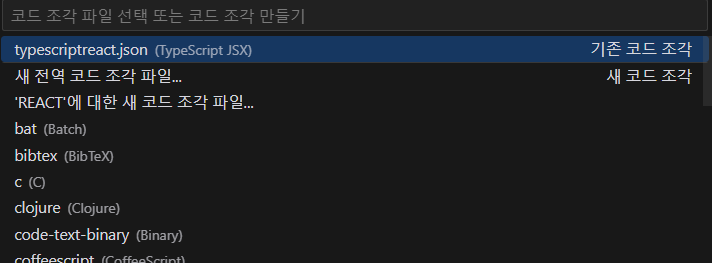
3.파일에서 원하는 바대로 수정을 한다.
{
// Place your snippets for typescriptreact here. Each snippet is defined under a snippet name and has a prefix, body and
// description. The prefix is what is used to trigger the snippet and the body will be expanded and inserted. Possible variables are:
// ${TM_FILENAME_BASE}, $2 for tab stops, $0 for the final cursor position, and ${1:label}, ${2:another} for placeholders. Placeholders with the
// same ids are connected.
// Example:
"My TS React Arrow Function Export Components": {
"prefix": "mtsrafce",
"body": [
"import React from 'react';",
"",
"interface ${TM_FILENAME_BASE}Props {}",
"",
"const ${TM_FILENAME_BASE} = <T extends ${TM_FILENAME_BASE}Props>({}: T) => {",
" return <div>$2</div>;",
"};",
"",
"export default ${TM_FILENAME_BASE};"
],
"description": "Create a React functional component with generic TypeScript props"
}
}
아래 파일을 수정할 때에는
원하는 바를 먼저 코드로 치고
GPT에게 만들어 달라고 하면 더 쉽게 할 수 있습니다.
하지만 GPT가 만능은 아니라

안되는 부분이 있을 시 더블 체크는 필수 입니다.
모두 반복되는 고통에서 탈출하세요~
{
	// Place your snippets for typescriptreact here. Each snippet is defined under a snippet name and has a prefix, body and
	// description. The prefix is what is used to trigger the snippet and the body will be expanded and inserted. Possible variables are:
	// ${TM_FILENAME_BASE}, $2 for tab stops, $0 for the final cursor position, and ${1:label}, ${2:another} for placeholders. Placeholders with the
	// same ids are connected.
	// Example:
	"My TS React Arrow Function Export Components": {
		"prefix": "mtsrafce",
		"body": [
      "",
      "interface ${TM_FILENAME_BASE}Props {}",
      "",
      "const ${TM_FILENAME_BASE} = ({}:${TM_FILENAME_BASE}Props) => {",
      "  return <div>$2</div>;",
      "};",
      "",
      "export default ${TM_FILENAME_BASE};"
    ],
    "description": "Create a React functional component with generic TypeScript props"
	},

 "My Routes Ts React Arrow Function Export Page Components": {
  "prefix": "mrtsrafce",
  "body": [
    "",
    "interface ${TM_FILENAME_BASE/(.*)/${1:/capitalize}/}PageProps {}",
    "",
    "const ${TM_FILENAME_BASE/(.*)/${1:/capitalize}/}Page =  ({}: ${TM_FILENAME_BASE/(.*)/${1:/capitalize}/}PageProps) => {",
    "  return <div>$2</div>;",
    "};",
    "",
    "export default ${TM_FILENAME_BASE/(.*)/${1:/capitalize}/}Page;"
  ],
  "description": "Create a React functional page component with generic TypeScript props for routes folder"
}
}
쓸대없이 제네릭 쓰면 좋지 않다고해서
수정
routs안에 들어갈 컴포넌트 양식 추가
'개발 > 기록' 카테고리의 다른 글
| current target과 target의 차이점 (3) | 2024.09.13 |
|---|---|
| 기존 react 프로젝트 typescript 프로젝트로 만들기 (0) | 2024.08.29 |
| eslint import/extensions error (2) | 2024.01.06 |
| due to high demand we've temporarily paused upgrades gpt-plus 업그레이드 제한[막힘] (1) | 2023.12.13 |
| vscode 저장시 자동 정렬 (1) | 2023.11.28 |